1 credit · 1 photo
AI 90s yearbook generator
One selfie in, one peak-90s yearbook portrait out — frosted tips, denim jacket, the laser-grid backdrop your aunt actually sat for.
Powered by FLUX · ~30s · 7-day input deletion · You own the photo
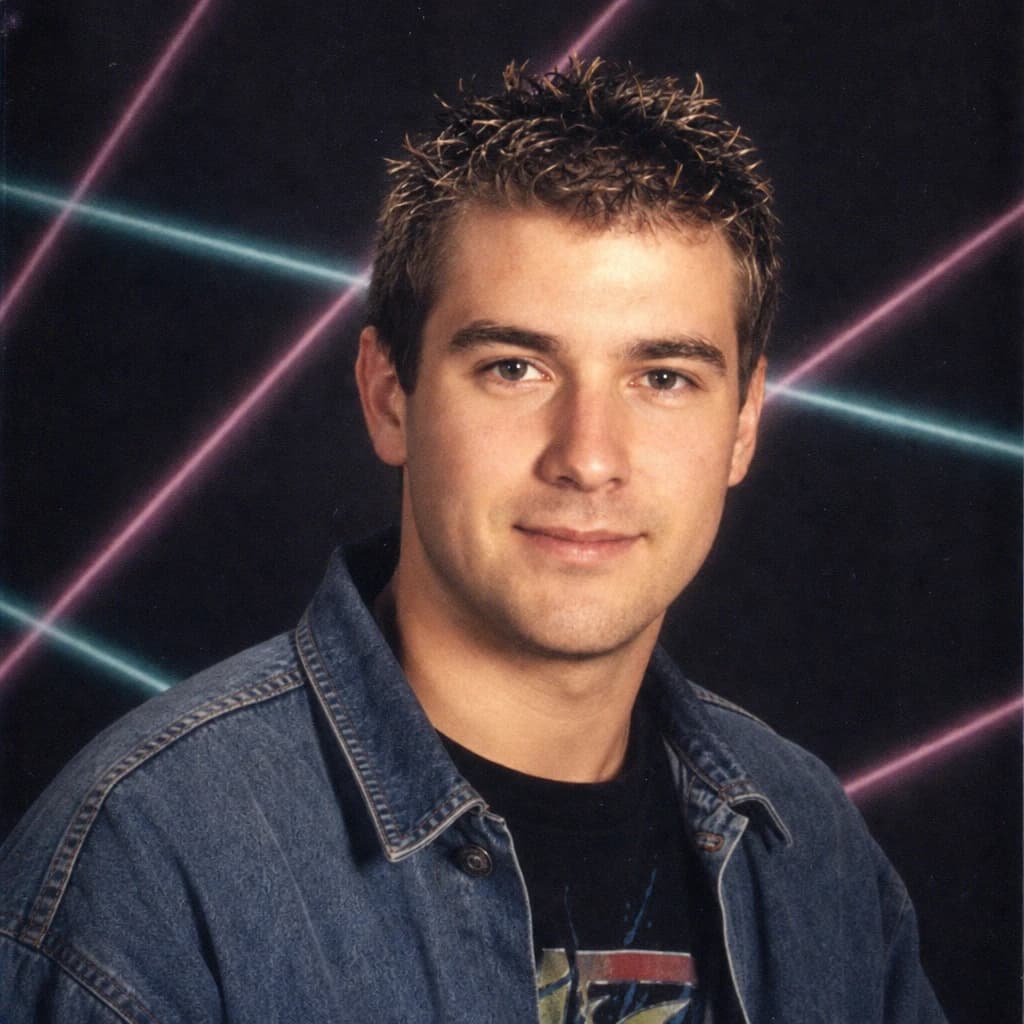
The AI 90s yearbook generator turns one photo into a peak-90s school portrait — frosted-tip hair, denim or color-blocked outfit, laser-grid or fade-pattern backdrop, soft studio flash, that exact early-90s school-photographer vibe. Lumapic's model preserves your face and rebuilds everything around it.
Early-90s vs late-90s — which era to pick
The 90s look split visibly mid-decade and a good yearbook generator should know the difference.
Early-90s (1991–94): denim jackets, flannel, neutral school-portrait backdrops (gray, blue, or that swirly pastel pattern), softer studio flash, more conservative hair — center parts, neutral shoulder-length cuts, modest frosted tips. The grunge influence in clothing, the still-conservative photography. Pick early-90s for nostalgia that feels real.
Late-90s (1995–99): laser-grid backdrops, color-blocked sweaters or polo shirts, frosted-tip explosion, more saturated palette, often a slight cyan-magenta color cast from the era's photo processing. The MTV-coded version of the decade. Pick late-90s for the over-the-top viral look.
Why most AI 90s yearbooks look fake
Most 90s yearbook AI tools fail in two predictable ways. First, they treat "90s" as one era and produce a generic mash-up of features that didn't actually coexist (a 1991 photo with a 1998 backdrop, or vice versa). The result reads as "AI-imagined 90s" rather than as a real period photo.
Second, they overlay a backdrop pattern rather than rebuilding the lighting and color cast. Real 90s school photos have a specific magenta-green color shift from expired or under-corrected color film, slight grain from the lower-ISO film stock, and the soft drop-off of the era's school-photographer-strobe rig. Lumapic re-lights for those properties.
AI yearbook generator vs. EPIK — the 2023 viral original
EPIK launched the 90s yearbook AI trend in 2023 with viral 60-photo packs at $5.99. It set the cultural reference point for what an "AI yearbook" should look like.
The EPIK trade-off is that every photo in a pack uses the same backdrop, same lighting, and same era — they're optimized for batch share, not for getting one specific photo exactly right. Lumapic generates per-photo at $0.25, which means you can pick early or late 90s, vary the hair direction, change wardrobe across multiple runs, and only pay for outputs you actually use. For viral pack content, EPIK. For one specific photo, Lumapic.
What input photo works best for the 90s yearbook AI
Front-facing photos work best — school photographers in 1993 used dead-center framing. Neutral expressions read more authentically 90s-yearbook than a wide smile (the wide-smile yearbook photo is a 2000s convention).
Current hairstyle is fine; the model restyles it. If the hair restyle goes too far (full mullet when you wanted modest), try a photo with longer current hair as input — the model uses your current cut as a starting reference. A plain background in the input gives the model the most room for the laser-grid backdrop.
What to use it for
Six real surfaces.
- Share as a fake 'throwback Thursday' your friends will actually believe
- Make a 90s-themed birthday party invitation
- Print as a gag gift for someone's milestone birthday
- Generate matching yearbook portraits for a friend group
- Use as the album art for a 90s-themed playlist or zine
- Make a costume-party reference photo before the event
How it works
From upload to finished photo.
01
Upload one front-facing photo
JPG, PNG, or WebP, at least 1024px. Current hairstyle is fine — the model restyles it.
02
The model renders the 90s yearbook pass
Hair restyled (frosted tips or center-part), wardrobe swapped to 90s denim or color-block, laser-grid backdrop, studio flash with film cast.
03
Download the result
Final JPG at 2048px in school-portrait 4:5 framing. About 30 seconds. 1 credit.
Tips for best results
What actually helps.
- Front-facing photos work best — school photographers in 1993 used dead-center framing
- Neutral expressions read more 90s-yearbook than a wide smile
- If the hair restyle goes too far (full mullet), try a photo with longer current hair as the input
- The model preserves your skin tone — don't worry about the film-cast hue making you look different
- A plain background in the input gives the model the most room for the laser-grid
- If you want the early-90s vs late-90s look, choose a more neutral expression for early, a confident smirk for late
Honest comparison
How this stacks up against alternatives.
Lumapic 90s Yearbook vs. EPIK Yearbook: EPIK's viral yearbook AI was the original — fast, cheap, and produces 60-photo packs. The trade-off is that every output uses the same backdrop and the same lighting, so a pack of 60 looks like 60 versions of the same school. Lumapic generates per-photo, so you can vary the backdrop, hair direction, and wardrobe across multiple runs. For a viral 60-pack, EPIK. For a specific photo you'll keep, Lumapic.
FAQ
Common questions.
What's the difference between early-90s and late-90s yearbook AI?
Early-90s (1991–94) is denim jackets, flannel, neutral backdrops, modest frosted tips, softer flash. Late-90s (1995–99) is laser-grid backdrops, color-blocked sweaters or polos, full frosted-tip explosion, slight cyan-magenta color cast from the era's photo processing. Pick the one that matches the vibe you want — they don't mix well.
Does it match the iconic 90s yearbook look?
Yes — the model rebuilds the lighting and color cast, not just the backdrop. Real 90s school photos have a specific magenta-green color shift from the era's color film, slight grain from lower-ISO film stock, and the soft drop-off of the school-photographer-strobe rig. Most AI tools just overlay a laser-grid pattern; Lumapic re-lights.
Will it look like me?
Yes — your face and skin tone are preserved exactly. The model only changes hair (restyling toward 90s cuts), wardrobe (90s denim or color-block), backdrop, and lighting. We don't change your ethnicity or replace features with a generic '90s teen' template.
How does this compare to EPIK Yearbook?
EPIK launched the viral 90s yearbook AI trend in 2023 with 60-photo packs at $5.99 — every photo in the pack uses the same backdrop and lighting. Lumapic generates per-photo at $0.25, so you can pick early or late 90s, vary the hair direction, and only pay for outputs you actually use. For viral pack content, EPIK. For one specific photo, Lumapic.
How long does it take?
Around 30 seconds per photo.
How much does it cost?
1 credit ($0.25) per photo. Credit packs start at $2.99 for 12 credits. Credits never expire.
What input photo works best?
Front-facing photos work best — school photographers in 1993 used dead-center framing. Neutral expressions read more authentically 90s-yearbook than a wide smile. Current hairstyle is fine; the model restyles it toward 90s cuts.


Make your ai 90s yearbook generator in seconds.
Pay as you go. Packs from $2.99. Never expire.