1 credit · 1 photo
AI LinkedIn headshot generator
One selfie in, one recruiter-ready LinkedIn photo out — soft light, neutral backdrop, the framing that survives a 110px circle crop.
Powered by FLUX · ~30s · 7-day input deletion · You own the photo
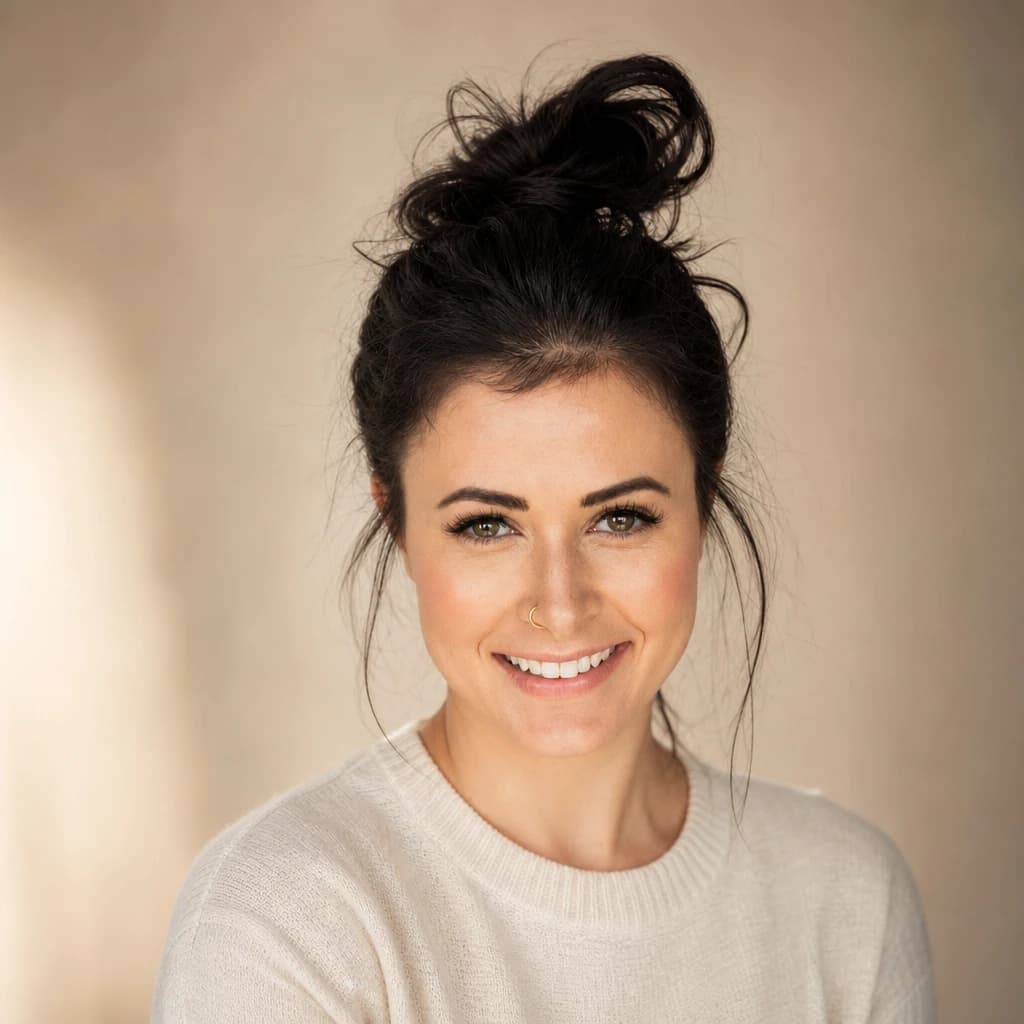
The AI LinkedIn headshot generator takes one selfie and produces a profile photo built for the LinkedIn product specifically — circle-crop safe at 110px, soft front-key lighting, neutral backdrop, business-casual wardrobe. Lumapic preserves your face and rebuilds the surrounding photo to recruiter-friendly studio standard in about 30 seconds.
What a LinkedIn headshot actually needs — vs. corporate
LinkedIn aesthetic is different from a corporate website headshot. Corporate is suit-and-tie, hard light, neutral expression. LinkedIn is warmer: open collar or sweater, soft front-key light, slight head tilt, a real smile.
The reason matters. Corporate headshots are about authority. LinkedIn photos are about being someone a recruiter wants to message — approachable, hireable, human. Same person, two different aesthetic targets. Most AI headshot generators don't distinguish.
Are AI LinkedIn photos OK for recruiters
In most industries: yes. Recruiters in marketing, tech, sales, consulting, real estate, education, healthcare administration, and creative fields generally don't flag AI-generated LinkedIn photos when the output preserves identity and reads as photography rather than rendering. The photo is doing its job — showing what you look like — and that's the bar.
The exceptions are conservative industries with strict photo norms: law firm partner pages, certain finance and consulting partner photos, VC firm team pages. Those audiences have started spotting AI tells. For those use cases, hire a real photographer. For everything else, an AI LinkedIn headshot does the job at 0.1% the cost.
AI LinkedIn headshot for tech, marketing, finance, consulting
Wardrobe varies by industry and most AI tools default to "generic suit" for everyone. The honest version:
Tech and creative — open collar, casual blazer or sweater. No tie. The senior engineer photo, not the financial-services photo. Marketing and sales — slightly sharper than tech, blazer over open collar, gentle smile. Consulting — open collar with blazer for junior, suit + tie for partner-track. Finance — suit + tie, even on LinkedIn. Wear something in that direction in your input photo; the model follows your existing wardrobe direction.
How AI LinkedIn photos compare to a real photographer
A LinkedIn-photo session with a real photographer runs $150–400 in most US markets, takes around an hour, and produces 3-10 finished shots. AI competitors like Aragon and HeadshotPro sell packs of 40-200 variants for $29-79 with hour-long turnaround.
Lumapic prices per photo at $0.25 with 30-second turnaround. You pay only for outputs you actually use. For one polished LinkedIn photo you need today, this is the lowest unit price on the market. For a full photo session with multiple looks, a real photographer.
What to use it for
Six real surfaces.
- Replace your decade-old LinkedIn photo without booking a studio
- Match the new job title with a fresh headshot the same week
- Use as the press photo for a podcast bio or speaking event
- Generate a matching set for a small company's team page
- Make a clean headshot for a recruiting profile or About page
- Update consistently across LinkedIn, About.me, and Twitter at once
How it works
From upload to finished photo.
01
Upload one front-facing photo
JPG, PNG, or WebP, at least 1024px. Any background works — the model replaces it. Eye contact in the input reads as confidence in the output.
02
The model renders the LinkedIn pass
Soft front-key + gentle fill lighting, neutral backdrop, business-casual wardrobe upgraded but kept in your existing style, framed to survive the circle crop.
03
Download the result
Final JPG at 2048px square. Upload directly to LinkedIn. About 30 seconds. 1 credit.
Tips for best results
What actually helps.
- Use a photo from this year — the model preserves your face exactly
- A solid-color top in the input gives cleaner wardrobe rendering than busy patterns
- Eye contact with the camera in the input reads as confidence in the output
- Avoid sunglasses; LinkedIn's 110px circle crop loses any context around the eyes
- A slight smile reads more LinkedIn than dead-serious — recruiters want approachable
- If the output crops awkwardly, try a wider input shot with more shoulder visible
Honest comparison
How this stacks up against alternatives.
Lumapic LinkedIn vs. Aragon AI LinkedIn Headshot: Aragon charges around $35–60 for a one-time studio pack of 40–100 outputs across multiple styles. Lumapic generates one polished headshot per credit ($0.25) in 30 seconds. If you need a corporate-team rollout with variety, Aragon. If you need one good headshot today, Lumapic.
FAQ
Common questions.
Are AI LinkedIn photos OK for recruiters?
In most industries: yes. Recruiters in marketing, tech, sales, consulting, real estate, education, healthcare administration, and creative fields generally don't flag AI LinkedIn photos when the output preserves identity and reads as photography. The exceptions are conservative industries — law firm partner pages, certain finance and consulting partner photos, VC firm team pages — where reviewers have started spotting AI tells. For those use cases, a real photographer is still the right call.
How is this different from the Professional Headshot?
LinkedIn Headshot is warmer than a corporate Professional Headshot — open collar or sweater instead of suit-and-tie, genuine smile, slight head tilt, soft natural background. Better for the LinkedIn product specifically. The Professional Headshot template is more formal and works for company About pages, press kits, and conservative-industry use.
What should I wear in the input photo?
The model follows your existing wardrobe direction. For tech and creative, wear an open collar or casual blazer — no tie. For marketing and sales, slightly sharper, blazer over open collar. For consulting and finance, suit + tie. Wear something in that direction in your input; the AI doesn't invent the wardrobe, it cleans up what's there.
Will it look like me?
Yes — your face, hair, and key features are preserved exactly. The model only changes wardrobe, lighting, and background to match the LinkedIn aesthetic. Identity preservation is the priority — most AI LinkedIn tools smooth features past recognition, which is exactly what you don't want on a profile recruiters will compare to your video-call appearance.
Will the photo survive LinkedIn's circle crop?
Yes. LinkedIn crops profile photos to a 110px circle on the feed. The model frames the output so the face stays centered and the chin doesn't get cut off at the bottom edge of the circle. If you want to test, upload the result to LinkedIn before committing.
How long does it take?
Around 30 seconds.
How much does it cost?
1 credit ($0.25) per photo. Credit packs start at $2.99 for 12 credits. Credits never expire.
More like this
If you liked LinkedIn Headshot

Make your ai linkedin headshot generator in seconds.
Pay as you go. Packs from $2.99. Never expire.